

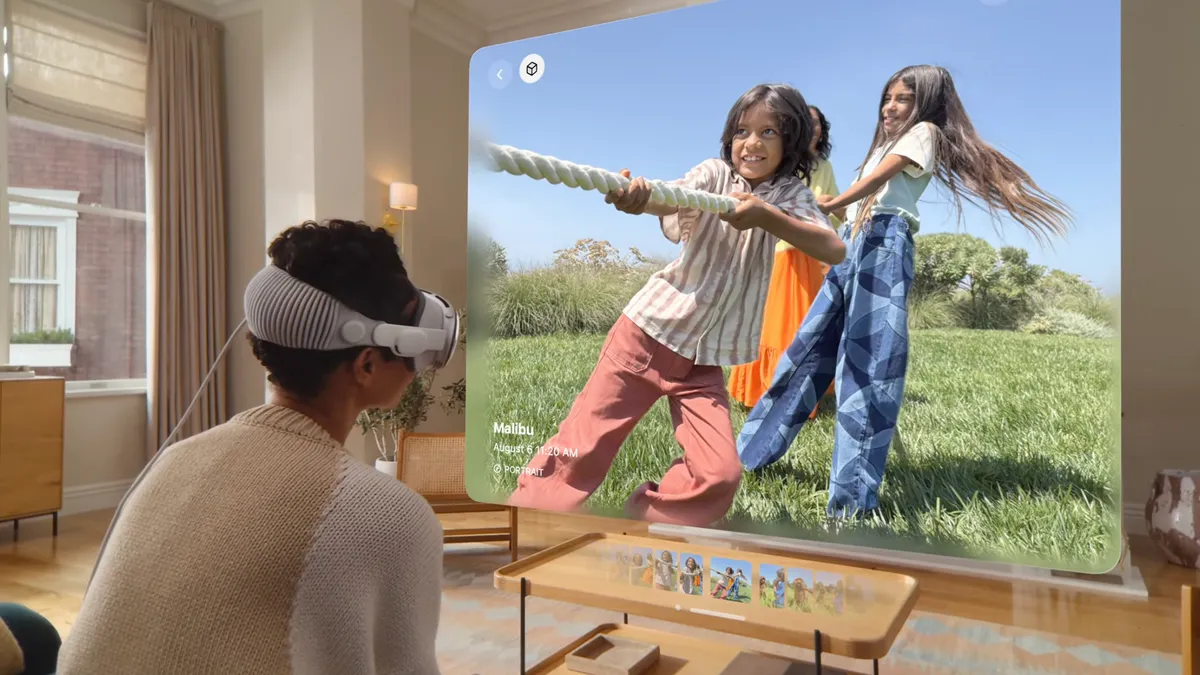
A flat video can save what happened, but it often misses how the room felt. Spatial Video Capture gives iPhone owners a way to record a scene with depth, so a birthday candle, a dog crossing the kitchen, or a kid running toward the camera can feel closer when viewed later on Apple Vision Pro. The idea is simple: your phone records two slightly different views, then Vision Pro presents them in a way your eyes read as space. For U.S. buyers deciding whether this matters beyond a demo, the honest answer is that it depends on what you film. Big action is not always the winner. Small family moments, home tours, holiday tables, and first steps often carry the strongest effect. That is why this feature belongs less in the “camera trick” box and more in the memory box. If you follow consumer tech coverage for connected living, practical device reporting helps place features like this in daily use, not hype. Apple’s own guide says supported iPhones can record spatial photos and videos for three-dimensional viewing in Photos on Apple Vision Pro.
Why Spatial Video Capture Feels Different From Regular iPhone Video
Regular iPhone video asks you to remember distance. This newer format gives your eyes a better hint. That sounds like a small shift until you watch a clip where a person steps out from behind a kitchen island or a child leans toward a cake. The screen no longer feels like a window painted on glass. It feels more like a shallow box holding the moment. That shift changes what counts as a good video. A clip does not need a big event to feel worth saving. It needs people and objects placed at different distances, with enough stillness for your eyes to settle.
Why two lenses change the feel of a clip
The effect starts with the way iPhone records the scene. On iPhone, the Wide and Ultra Wide cameras sit side by side, and landscape orientation places them along a line that works more like your eyes. Apple’s Final Cut Pro guide explains that iPhone records the main view from the Wide camera while the Ultra Wide view is cropped and scaled for the second layer. That is why holding the phone sideways is not a minor tip. It lines the cameras up in a way that gives the clip a better chance to feel natural later.
That second layer is not there for drama. It gives Vision Pro enough left-eye and right-eye difference to show depth. A coffee mug in the foreground, a parent on the couch, and a window behind them no longer flatten into one plane. The distance between them starts to matter. You may notice the edge of a table, the open doorway behind someone, or a hand reaching toward the lens. Those details can feel forgettable on a phone screen. In a headset, they help rebuild the room.
The non-obvious part is that this can make ordinary clips stronger than scenic ones. A wide shot of the Grand Canyon may look grand in 2D, but a living room clip with a toddler three feet from the lens and grandparents eight feet back can show clearer depth. Spatial photos and videos reward layers, not size. That is good news for most people, because their most meaningful scenes are not shot on vacation. They happen beside the sink, in the driveway, or at the end of a school day.
What Apple Vision Pro viewing changes in family clips
Apple Vision Pro viewing matters because the headset controls the space around the video. On a phone screen, the same file can look familiar. Inside the headset, your eyes get a stronger sense of placement, and the clip can feel less like footage and more like a visit. The effect is not the same as watching a huge movie screen. It is more personal than that. You are looking into a recorded pocket of space.
That can hit hardest with common U.S. family scenes: Thanksgiving tables, high school graduation mornings, backyard cookouts, or a new apartment walkthrough before furniture arrives. These moments are not polished. They have chairs in the way, clutter on counters, and someone talking off-camera. Oddly, that mess helps. A chair back near the lens can become a depth marker. A hallway behind the subject can make the room feel longer. The small stuff does work.
Depth makes imperfection useful. A clean, centered clip can feel sterile, while a room with a foreground, middle, and back layer gives the viewer somewhere to look. If you are planning to record iPhone spatial video for Vision Pro, stop chasing postcard shots and start noticing the room. Ask what the viewer will sense behind the person, beside the person, and in front of the person. That habit alone can improve the clip more than buying an accessory.
What You Need Before You Record on iPhone
The feature feels futuristic, but the setup is grounded. You need the right iPhone, the right software, good light, and a steady hand. Miss one of those, and the result may still play, but it can lose the comfort that makes the format worth keeping. A good clip begins before you press Record. You decide where to stand, what to include, and whether the scene has enough calm to let depth show up. That planning takes seconds, not a production crew.
Which iPhone models can record it
Apple’s current iPhone guide lists iPhone 15 Pro, iPhone 15 Pro Max, iPhone 16, iPhone 16 Plus, iPhone 16 Pro, iPhone 16 Pro Max, iPhone 17, iPhone 17 Pro, and iPhone 17 Pro Max as models that can record spatial photos and videos. That matters for shoppers because the feature is no longer only a Pro-only story in Apple’s current lineup. It also means used and carrier-financed phones may enter the conversation for families who care about memory recording more than camera bragging rights.
For someone in the U.S. upgrading through a carrier plan, that changes the math. A parent may not need the top storage tier or the most expensive camera phone if the goal is recording a few family clips for Vision Pro. The better question becomes: will this model record the format, and will I shoot enough moments to care? A buyer who records youth sports every weekend may value storage. A buyer who records ten holiday clips a year may care more about model support and iCloud backup.
This is also where iPhone camera settings guide can help your site readers compare camera habits before they spend money. A spec list is useful, but habits decide whether a feature becomes part of life or disappears after one weekend. The best camera feature is the one you remember to turn on at the right time. That is not a slogan. It is how family archives are made.
Why distance and light matter more than resolution
Apple’s official iPhone support guide tells users to open Camera, choose Spatial mode, rotate iPhone to landscape, keep the phone steady and level, frame subjects 3 to 8 feet away, and shoot in even, bright light. Those tips sound plain, but they protect the whole illusion. Depth is fragile when the camera is too close, tilted, dim, or moving for no reason.
Distance is the quiet hero. Too close, and the depth can feel strained. Too far, and the scene becomes flat again. The sweet spot is often a kitchen, porch, nursery, or living room where a person can stand a few steps away and still have space behind them. A child blowing bubbles in a backyard can work well because the person, bubbles, fence, and trees may sit in separate layers. A close-up of a face may feel less comfortable.
Light matters because the format already asks the cameras to do extra work. A dim restaurant may hold emotional value, yet it may not create the cleanest result. A Saturday morning breakfast at home, with window light and a person sitting across the table, may beat a fancy night scene. This is where the feature teaches a lesson that applies to all phone cameras: the rare moment is not always the best-looking moment. The repeatable, well-lit moment may age better.
How to Shoot Clips People Will Want to Rewatch
Recording for depth is not the same as recording for social media. Short clips, slow movement, and clear layers usually win. The phone should feel like a small window you are holding steady, not a camera you wave around to prove you were there. This is a different instinct from quick vertical clips made for feeds. You are not trying to grab attention in two seconds. You are trying to preserve space so a future viewer can sit inside the memory for a moment.
Hold the phone like a small window, not a movie rig
Keep the iPhone in landscape and resist the urge to pan across everything. Spatial clips can become tiring when the camera moves too much because the viewer’s eyes are trying to read depth while the world shifts. The calmer shot often feels richer. Plant your elbows near your ribs, breathe, and let the scene unfold. If someone walks into frame, let them. If they leave frame, let that happen too.
A good test is the “doorway rule.” Stand in a doorway and record into a room for ten seconds. Let one person cross the foreground, let another sit farther back, and let the room breathe. You may capture more usable depth than you would by walking through the whole house. The doorway gives the clip a natural frame, and the room gives it depth. It feels simple because it is.
This is where people get the feature wrong. They assume movement makes the clip immersive. In practice, restraint often does more. A steady shot lets Apple Vision Pro viewing show the distance between things, while a restless shot turns depth into noise. Think of it like holding a snow globe still long enough to see the house inside. Shake it, and all you get is motion.
Choose moments with depth, not chaos
The best iPhone spatial video often has a simple subject and a layered setting. A kid opening a present near the camera, relatives on the sofa behind them, and a lit tree in the corner can work better than a packed school gym with everyone moving at once. Busy scenes may feel exciting while they happen, but they can become hard to watch later. The eye needs a place to land.
Think in zones. Foreground could be a hand, a plate, a pet, or the edge of a crib. Middle ground is the person you care about. Background gives context: a room, a yard, a hallway, or a skyline through a window. You are not staging a film. You are giving the memory room to stand up. If you can name those three zones before you record, the clip probably has a chance.
For readers building a modern media setup at home, smart home media setup guide can connect this habit with storage, iCloud Photos, Wi-Fi, and viewing routines. The recording is only half the experience. The other half is making sure the clip is easy to find later. A forgotten file has no emotional power. A labeled album called “Dad’s 70th” or “First House” can turn a small clip into a family object.
How Viewing, Sharing, and Editing Fit Into Daily Life
A feature becomes useful when it survives normal behavior. People share clips, back them up, edit them, and show them to relatives who may not own the same device. Spatial media is strongest when you know what happens after the shutter tap. This matters because no family uses technology in a perfect Apple demo loop. Phones get full. People send clips through messages. Grandparents watch on whatever screen is nearby. The format has to bend without breaking.
What happens when you share the clip
Apple says spatial photos and videos can sync across your devices when you use the same Apple Account with iCloud Photos turned on. The same guide also says you can view and share them like regular photos and videos on other Apple devices. That means the file is not trapped inside the headset. It can live inside the same photo habits people already have.
There is a catch, though, and it is a practical one. On Apple Vision Pro, the depth is the point. On other devices, the clip appears more like normal media. Apple’s Vision Pro guide says spatial photos and videos look 3D on Vision Pro and appear 2D on other devices. A shared clip may impress one person and feel ordinary to another, depending on where they watch it.
That is not a failure. It is a bridge. Your sister can watch the clip on an iPhone today, then see the depth later if she visits and puts on the headset. For families, that matters more than chasing perfect compatibility across every screen. The format can act like a future-ready layer inside an ordinary video library. You may not need the payoff on day one.
Where editing helps and where it hurts
Editing spatial video has rules that normal phone footage does not. Apple’s Final Cut Pro guide says iPhone spatial video records at 1920 x 1080, 30 fps, in SDR, and uses MV-HEVC, which stores stereoscopic views in separate layers. The file carries more structure than a standard clip. That structure is useful, but it also means careless editing can damage the feel.
That structure is why heavy editing can be risky. Trimming the start and end may help. Cutting shaky seconds may save the clip. But aggressive effects, fast cuts, and mood filters can fight the clean depth that made the recording worth saving. A clip meant for Vision Pro should not always follow the rules of a TikTok edit. Sometimes the best choice is to leave the pause in.
The better editing style is almost boring: trim, label, store, and leave the moment alone. A ten-second clip of your father laughing at a diner booth may not need music. It needs to stay steady, clear, and easy to open five years from now. That is the deeper discipline here. Do less, so the memory can do more.
Conclusion
The value of this feature is not that it makes every iPhone owner a 3D filmmaker. That is the wrong lens. The better promise is quieter: it gives everyday people a way to save certain moments with more presence than a flat clip can hold. Spatial Video Capture works best when you stop treating it like a spectacle and start treating it like a memory tool. Use it for rooms, faces, distance, and small motion. Use it when the setting matters as much as the subject. For U.S. buyers, the decision should be practical. If you already plan to own Vision Pro or share clips with someone who does, the feature can earn its place. If you do not, it may still be worth recording key moments now so they age into richer keepsakes later. Start with one calm family clip this week, then watch what depth does to your memory.
Frequently Asked Questions
How do I record a spatial video on my iPhone?
Open Camera, choose Spatial mode, rotate the iPhone to landscape, and keep the phone steady while recording. Good lighting helps, and subjects should sit a few feet from the camera. Short, calm clips usually look better than long clips with heavy motion.
Which iPhones can record spatial photos and videos?
Apple’s current list includes iPhone 15 Pro and Pro Max, the iPhone 16 family, and the iPhone 17 family. Check Apple’s support page before buying, since model support can change as new iPhones and iOS versions arrive.
Can I watch a spatial video without Apple Vision Pro?
Yes, but you will not get the same depth effect. On regular Apple devices, these clips can appear like normal photos or videos. Vision Pro is the device that gives the recording its three-dimensional feel.
Is iPhone spatial video worth recording for family memories?
Yes, for moments with people, rooms, and depth. Birthdays, graduations, holidays, pet clips, and home tours are strong choices. It is less useful for distant landscapes or shaky concert clips where depth cues are weak.
What is the best distance for recording spatial video?
Apple recommends keeping subjects about 3 to 8 feet from the iPhone. That range gives the cameras enough separation to create pleasing depth. It also keeps faces and movement readable without making the scene feel cramped.
Does spatial video take more storage than regular video?
It can take meaningful space because it stores depth-related information along with the video. Treat key clips like keepsakes rather than recording everything this way. Save the format for moments you may want to revisit in Vision Pro.
Can Apple Vision Pro record spatial photos and videos too?
Yes. Vision Pro can capture spatial photos and videos directly, and users can view them in the Photos app. Still, many people may prefer iPhone recording because it feels more natural at family events.
What kind of lighting works best for spatial video?
Even, bright light works best. Window light, shaded porches, and well-lit rooms are better than dark restaurants or harsh backlighting. Cleaner light helps the iPhone keep detail in both camera views, which supports a more comfortable depth effect.